Day 1: 7 days of Reactjs for Absolute beginners.

Software engineer, aiming to design and develop experiences that make people’s lives simple
Most of the cool kids are using react, why?. The main purpose of React is to be fast, scalable, and simple while allowing developers to create large web applications that can change data, without reloading the page. React is a Javascript library used to build User Interfaces and component UI, It was built by Facebook back in 2011, with its newsfeed being the first use case.
Photo by Lautaro Andreani on Unsplash
Disclaimer: In no way, am I saying that I learnt all aspects of React in a week. This gave me the ability to think in React (declarative, components, props and state). Plus my prerequisite was a good grasp of Javascript.
DAY ONE
- Installing React.
- React App structure.
A declarative style like react, allows you to control flow and state in your application by saying “It should look like this” as opposed to an imperative style which allows you to control your application by saying “This is what you should do”.
Installing React
To use react you need to install node.js, if you don’t already have node install visit https://nodejs.org/en/download/ and select a version depending on your the operating system.
node.js comes with npm or in this case, npx (node package execute) which we can use to create a react app.
To check which version of node you have installed
node -v
To create a react app (my-react-app) with npx
npx create-react-app my-react-app
React App Structure
It’s most said that react is all about components.
“ Components refer to small independent parts of your app of specific functionality and UI that can be re-used throughout your app. For example, Button, Header and Footer Components.” but more about components on day 2.
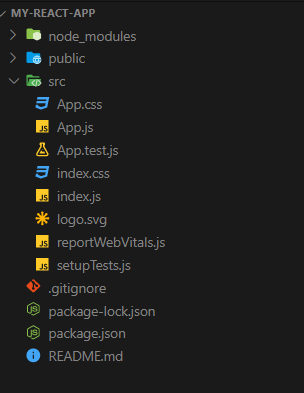
React folder structure
The public folder contains static files like index. html, images, and other assets. which don’t need to be processed by the webpack.
the src folder, which initially contains the App.js file which you can edit the app.
index.js, the main/ entry file which allows you to import the parent file (App.js) as a module.
package.json, which holds a list of dependencies for your project plus some metadata like name, version etc.
Conclusion
Day one was a general introduction to the library and nothing complicated. You could check out day two, where I share about components, class vs functional components.
Thanks for reading.


